
![How to Delete a Google Review: Step-by-Step Guide [2026]](https://cronuts.digital/wp-content/uploads/2026/07/portada-71008-1-1024x538.webp)
TL;DR · executive summary
What you’ll find in this article
In this guide we explain exactly how to delete a Google review step by step, what to do if Google rejects your request, how long the process takes and how to manage negative reviews you cannot remove....
In this guide we explain exactly how to delete a Google review step by step, what to do if Google rejects your request, how long the process takes and how to manage negative reviews you cannot remove.
93% of consumers read reviews before making a purchase decision. A single negative review in the top positions can reduce your conversion rate by between 22% and 40%. If you have a fake, unfair or policy-violating review, you have the right to request its removal.
What you will learn in this guide
- How to delete a Google review from Google My Business in 7 steps
- How to remove a review directly from Google Maps
- How to identify whether a negative review is fake or real
- What to do when Google rejects your removal request
- Real timelines: how long Google takes to respond (3–30 days)
- How to manage negative reviews you cannot remove
Why Google reviews matter so much for your business
Google reviews are one of the most important local ranking factors. A profile with more reviews and a better rating appears higher on Google Maps and in the local pack of search results. Moreover, they directly influence purchase decisions: 88% of consumers trust online reviews as much as a personal recommendation.
That is why a fake or unfair review is not just an image problem: it is a direct threat to your revenue. And Google gives you tools to fight it.
How to delete a Google review from Google My Business: step by step
Google My Business (now called Google Business Profile) is the main panel for managing your business reviews. Follow these steps to report a review that violates Google’s policies:
- Access your Google Business Profile at business.google.com with the account that manages the business.
- Select your location if you manage multiple businesses or have several branches.
- Click “Reviews” in the left sidebar menu.
- Locate the review you want to remove. You can filter by rating to find it faster.
- Click the three vertical dots (⋮) on the right side of the review.
- Select “Report review” from the dropdown menu.
- Choose the reason that best describes the violation (spam, false content, conflict of interest, offensive language, etc.) and confirm the report.
⏱️ Estimated process time: 3 minutes to report. Google review: between 3 and 30 days.
⚠️ Important: Google only removes reviews that violate its policies. Negative genuine reviews — even if unfair — are not removed just for being negative. We explain what to do in that case below.
How to remove a review from Google Maps
If you prefer to operate directly from Google Maps, the process is similar but through a different route:
- Open Google Maps in your browser or mobile app.
- Search for your business name or click on your listing if it appears directly.
- Go to the reviews section by clicking on the rating or “See all reviews.”
- Locate the review you want to report.
- Click the three dots (⋮) next to the review and select “Report review.” Follow the on-screen instructions.
Comparison table: Google Business Profile vs. Google Maps
| Google Business Profile | Google Maps | |
|---|---|---|
| Access | business.google.com | maps.google.com or app |
| Requires owner login | Yes | Yes |
| Available filters | By rating, date, replied | Limited |
| Best for | Full management and tracking | Quick mobile access |
| Report outcome | Identical: Google review | Identical: Google review |
How to identify whether a negative review is fake
Before reporting a review, it is worth checking whether it actually violates Google’s policies. These signs indicate it may be fake or malicious:
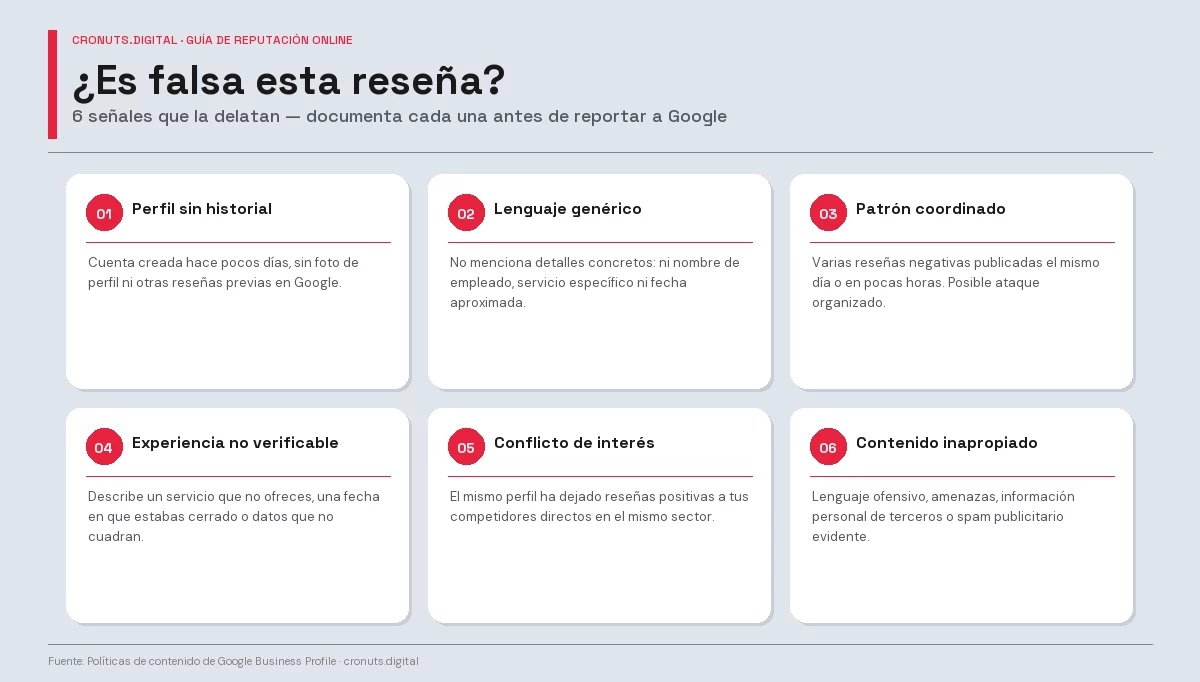
- Profile with no history: new account created days ago, no photo or other reviews.
- Generic language: no specific details of the experience (employee name, specific service, approximate date).
- Multiple negative reviews on the same day: coordinated pattern, possible organised attack.
- Verifiable contradiction: the review describes a service you do not offer or a date when you were closed.
- Conflict of interest: profile that has also left positive reviews for your direct competitors.
- Inappropriate content: offensive language, threats, third-party personal information or advertising content.
Document these signs before reporting: the more specific your complaint, the more likely Google is to review it favourably.
What to do when Google rejects your removal request
1. Report again with more detail
The first complaint is usually processed automatically. If rejected, try again with a more specific description of the violation reason. Select the most precise reason and add context if the form allows it.
2. Request manual review from Google support
From Google Business Profile you can request a human review of your case through the support form. Attach screenshots, comparisons and any evidence that proves the review is fake or violates policies.
3. Respond publicly in a professional manner
If you cannot remove the review, a well-written public response can neutralise its impact. Future customers see how you handle criticism. An empathetic and factual response conveys more confidence than a listing with no replies.
4. Legal route in cases of defamation
If the review contains false and verifiably damaging information about your reputation, you can request its removal through a legal process. Consult with a specialist lawyer before taking this route.
Real timelines: how long does Google take to delete a review?
| Case type | Usual timeframe | Estimated approval rate |
|---|---|---|
| Spam or automated content | 3–7 days | High (70–80%) |
| Offensive or inappropriate content | 3–10 days | High (65–75%) |
| Fake review / conflict of interest | 7–21 days | Medium (40–60%) |
| Manual review requested | 14–30 days | Variable based on evidence |
| Review after initial rejection | 10–30 days | Low without new evidence |
During the review process, the review remains visible. That is why it is important to manage your public response while you wait for Google’s resolution.
How to manage negative reviews you cannot remove
- Always reply: 53% of customers expect businesses to respond to negative reviews within a week.
- Be quick: responding within 24–48 hours reduces the negative impact.
- Do not defend, resolve: thank the feedback, acknowledge the issue (if real) and offer a concrete solution.
- Take the conversation offline: include a contact email or phone number to resolve the issue privately.
- Avoid legal or aggressive language: future customers will read it and it will worsen your image.
Response template for a negative review
“Hello [name], thank you for taking the time to share your experience with us. We are sorry it was not what you expected. We would like to understand what happened so we can improve and, if possible, resolve it with you directly. You can reach us at [email/phone]. We are at your disposal.”
Long-term strategy: dilute with positive reviews
The best defence against negative reviews is a solid base of positive reviews. Actively request reviews from satisfied customers via a direct link to your Google listing. One negative review among 50 positive ones has minimal impact; the same review among 5 positive ones can sink your rating.
Every unanswered negative review is a prospective customer who has decided to go to your competitor. Not because of the review itself, but because you have shown you do not listen.
Borja Planells, CO-CEO of cronuts.digital
Conclusion: managing your Google reputation is an investment, not an expense
Deleting a Google review is not always possible, but there is always something you can do: report, respond, appeal or generate more positive reviews to offset the impact. What you should never do is ignore it.
Your Google Business Profile is, in many cases, the first point of contact between your business and a potential customer. Active and professional management conveys exactly the right message.
Do you want a free audit of your Google presence? At cronuts.digital we analyse your Google Business Profile, your reviews and your local rankings and identify exactly what is holding back your visibility. Request your free audit →
Frequently Asked Questions
What CMOs and directors ask us.
8 concrete questions answered in ≤ 80 words · optimal format for AI Overviews.