
TL;DR · executive summary
What you’ll find in this article
LinkedIn is a social network with a huge potential to connect with your potential customers. In this article we explain what types of automated messages we can automate and how to do it. Nowadays there are two ways to automate messages on LinkedIn:...
LinkedIn is a social network with a huge potential to connect with your potential customers. In this article we explain what types of automated messages we can automate and how to do it. Nowadays there are two ways to automate messages on LinkedIn:
Payment methods
Within paid media, there are 2 types of ad formats that allow you to send direct messages to your potential customer. These are as follows:
-
- Message campaigns: these are messages that can be sent to a segment of LinkedIn users based on the segmentation you consider appropriate. Depending on the budget you allocate and the responses you get, more or less messages will be sent, as LinkedIn detects that it is a relevant message for your audience, and the cost will be lower. This type of ad allows you to include banners and a larger text space than a conventional message. Some of the recommendations we make when making message ads are the following, with an example:
-
-
- Introduce yourself and communicate a clear purpose.
- Keep the subject line concise and relevant. Consider using keywords, such as “Discover”, “Connect”, “Opportunities” and “Join us/me”.
- Limit your message to less than 500 characters.
- Add a link to the body of your message to promote visits to your website to achieve the goal you are looking for, whether it is brand awareness, traffic or conversions.
-

- Conversational Ad Campaigns: just like message ads, this type of advertising format is designed to establish a direct and private communication with your potential customer. The most important thing is to be clear and to be able to provide value. The way it works is quite simple: a segmentation is established, and then the messages are sent automatically by the Linkedin advertising platform. The volume of messages is determined by the advertising budget you allocate to the campaign, as well as the engagement your message generates. Conversation ads are charged on a cost-per-send (CPS) basis and are available under four objectives in Campaign Manager:
-
-
- Brand awareness
- Website visits
- Engagement
- lead generation
- Website conversions
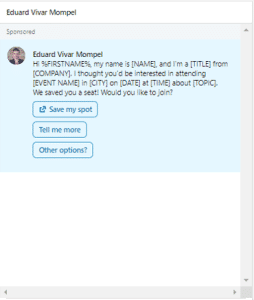
- We have attached an example with dynamic fields for you to see how it would look like.
-
-
-
- With conversational ads, you can set up multiple call-to-action buttons (CTAs) as you see in the example that link to your website, open a LinkedIn lead generation form and encourage engagement with more information in the next message.
- Additionally, we would like to emphasise that neither this nor the previous advertising format allows you to set up message chains or automatic actions based on user response. This can be covered by LinkedIn Helper and other applications explained later in this guide.
- It is important to mention that this advertising format, like message ads, are received by your potential customer under the sponsored brand, with the potential rejection that this may entail. This is why we will now explore automated messages that can be sent without going through paid campaigns and that can also be automated.
-
Un informe de SeoProfy (2025) indica que el 97% de las empresas B2B utilizan LinkedIn para su estrategia de contenidos, siendo la plataforma social más efectiva para generación de leads B2B. — Fuente: SeoProfy, Social Media B2B Study, 2025
Organic media
If we want to avoid our messages being sponsored, we have 2 alternatives:
- Spend 8 hours a day adding potential clients on LinkedIn and send personalised messages to each of them, with the limitations of adding people to our network who are part of our second-degree contacts, limiting access to third-degree contacts. Unless we use Linkedin Sales Navigator.
- Use applications that exist on the market to automate certain actions on LinkedIn. For example, adding potential customers and sending follow-up message chains.
Some of the applications that exist are LinkedIn Helper, Phantom Buster, Expandi or Lempod, among many others. We have used some of them and we have chosen LinkedIn Helper because of its ease of use and the security it gives us by having different limitations when sending invitations and carrying out actions on the platform. It should be noted that the misuse of these applications can lead to the blocking of the profile of the person who is using them. This happens when we ignore the platform’s recommendations and perform more actions or send more invitations than recommended.
Pros and cons of using applications to automate messages on Linkedin
- PROS
- Messages are not perceived as sponsored messages by users.
- Automating this type of messages is cheaper than using paid platforms, although as we will explain below, the application has an implicit cost, and in most cases it is recommended to use it together with the Sales Navigator subscription.
- Workflows or chains of automatic actions can be carried out, such as, for example, inciting a profile that is not part of our network of contacts and sending one or more follow-up messages after a few days.
- CONS
- They are not tools that LinkedIn likes, and excessive use of them can lead to profile blocking.
- They do not work magic and require some manual intervention, especially when a potential client responds in the middle of an automated chain.
- Their misuse, spamming without adding value, makes the communication format increasingly uninteresting to the platform’s users.
Automating messages with LinkedIn Helper and Sales Navigator
We are going to explain step by step how to automate messages on LinkedIn using LinkedIn Helper and Sales Navigator. To do so, you must have a Sales Navigator licence and have LinkedIn Helper installed using the following links:
SALES NAVIGATOR: Hire at least the “Professional” licence.
LINKEDIN HELPER: Create account and download software.
Once we have both installed it is necessary to open LinkedIn Helper and enter our LinkedIn account details so that the application is synchronised with our account and can operate autonomously. In the following video we make a step-by-step tutorial on how to use the tool.
Example of a good automatic message chain
Invite & Follow up campaign:
- First message:
Hello {firstName},
I would like to invite you to join my professional network.
Thank you very much!
If there has been a reply, work the lead manually. If there has been no reply:
- Second message:
Hello {firstName},
We see that despite the pandemic you are still operating stronger than ever. Our sincere congratulations.
I have taken the trouble to check your profile and given your background and experience within the {industry} sector in Spain and having {mutualTotal} contacts in common, I think it is relevant to share with you a guide to which we are giving access to leading profiles in the sector in order to adapt hotel stays to home automation.
As we have recently visited your facilities and we see no signs of domotic systems, we think you may find it interesting.
https://manueltorresdesign.com/en/home-automation-for-hotels-everything-you-need-to-know/
Best regards!
If there has been a reply, please work on the lead manually. If there has been no reply:
- Third message:
Hello again {firstName},
If you found the content interesting, we have detected that {company}’s competitors are catching up in relation to home automation systems.
That said, it is still early days and you can position yourselves at the forefront of the sector. If you want we can analyse how to improve your rooms with home automation through an initial study without obligation.
If you are interested, we will be happy to help you in this transformation.
Best regards
If there has been no answer in any of the previous cases, leave the lead with the “contacted” tag and finish the workflow with the communications.
This post demonstrates the importance and potential of LinkedIn to approach potential customers in an automated and non-invasive way. In this way, we can optimise our resources, while connecting with our target group. A win-win, right?