

TL;DR · executive summary
What you’ll find in this article
If your site isn’t showing up where it should, it’s often not because you’re “missing keywords” or because the content is bad: it’s because the search engine isn’t even seeing what matters. And that’s where the crawler comes in. While you’re thinking about leads and closing opportunities, the crawler decides which pages it discovers, which ones it actually visits ...
If your site isn’t showing up where it should, it’s often not because you’re “missing keywords” or because the content is bad: it’s because the search engine isn’t even seeing what matters. And that’s where the crawler comes in. While you’re thinking about leads and closing opportunities, the crawler decides which pages it discovers, which ones it actually visits and which ones get left forgotten in a corner of your architecture.
According to BrightEdge (2025), organic traffic accounts for 53.3% of all web traffic, cementing its position as the most important acquisition channel.
At CRONUTS.DIGITAL we approach SEO with a very simple idea: if your site can’t be crawled properly, everything else becomes makeup. In this article you’ll understand what a crawler is, how it really works in the day-to-day of a B2B project in Spain, which technical signals help it (or hold it back) and how to turn crawling into an ally for gaining visibility without relying on “a thousand changes” that then never move the needle.
What is an SEO crawler?
An SEO crawler (also called a bot, spider or crawl robot) is an automated program that browses web pages by following links and collects information so that a search engine can discover, understand and update what’s on a site. In other words:
If your site can’t be crawled properly, the rest of your SEO is just makeup. We’ve seen projects where a misconfigured robots.txt left out 40% of business URLs. A crawler doesn’t forgive technical errors: it ignores them.
Albert Puig Navàs, CEO of CRONUTS.DIGITAL
What a crawler does exactly
When a crawler arrives at a site, it usually:
- Discovers URLs: it enters through a URL (home, sitemap, external links) and finds new pages through internal links.
- Reads content and resources: it analyzes HTML, titles, headings, text, structured data, canonical, hreflang, etc. Depending on the case, it also tries to load resources such as CSS/JS to interpret the page.
- Detects technical signals: HTTP status (200, 301, 404…), redirects, chains, server errors, response times.
- Respects crawling rules: it takes into account
robots.txt, meta robots (noindex,nofollow), headers (X-Robots-Tag) and other limits. - Sends the information for indexing: crawling doesn’t guarantee indexing; first it discovers and analyzes, and then the search engine decides whether to index.
Why it matters in SEO
The crawler shapes three key things:
- Discovery: if it doesn’t find a URL, that page practically “doesn’t exist” for the search engine.
- Efficiency: your crawling allowance (crawl budget) is limited; architecture, links and performance help the bot invest its time in what matters.
- Indexing quality: if the crawler sees thin, duplicate, blocked or confusing content (poorly rendered JS, incorrect canonical), indexing and ranking suffer.

Quick difference: crawler vs indexing vs ranking
Ranking: decides the position each page appears in for a specific search.
Crawler: visits and collects.
Indexing: stores/organizes what’s been crawled so it can be shown in results.
How does it affect my site?
A crawler determines which URLs it discovers, how often it visits them and which technical and content signals it interprets. In practice, it impacts:
- Indexing: if a URL isn’t crawled (or is crawled poorly), it’s usually indexed late or not at all.
- Organic visibility: important pages the bot rarely visits or finds with errors lose ranking opportunities.
- Resource consumption: inefficient crawling (lots of useless URLs, parameters, duplicates) makes the bot “spend” visits where it shouldn’t.
- Technical diagnosis: errors (4xx/5xx), long redirects, high load times or blocks can reduce crawling and the quality of what gets processed.
What do I do if I have crawling problems?
Tackle the problem in this order (from most blocking to most optimizable):
- Check whether the bot can access
- Review
robots.txtandDisallowrules. - Review meta robots / headers:
noindex,nofollow,X-Robots-Tag. - Make sure there are no blocks from WAF/CDN, rate limits or geoblocking.
- Identify errors and bottlenecks
- 5xx (server), 4xx (broken URLs) and timeouts.
- Redirect chains or loops (301→301→200).
- Slowness: high TTFB and unstable response.
- Ensure discovery of important URLs
- Up-to-date XML sitemap (only canonical, 200 URLs).
- Architecture and internal linking: make sure key pages don’t depend on internal searches or hidden links.
- Avoid orphan pages (with no internal links).
- Reduce duplicates and noise
- Uncontrolled parameters and facets (filters, sort, tracking).
- Infinite pagination or calendars that generate thousands of URLs.
- Misconfigured canonical that confuses the bot.
- Validate with data
- In Google Search Console: indexing reports, crawl stats, examples of affected URLs.
- Server logs: which bots come in, what they crawl, how often and what codes they receive.
- A crawl with an SEO tool to reproduce the problem in your architecture.
How do I optimize crawl budget?
The crawl budget determines how many pages of your site Google crawls in a given period. A site with thousands of low-quality URLs wastes its crawl budget and can leave critical business pages unindexed. Optimize it with these levers:
1) Prioritize what matters (signals that say “this deserves crawling”)
- Link strongly from navigation, categories, hubs and high-traffic content.
- Use a clear structure (low depth for key pages).
- Keep sitemaps clean and segmented (by content type).
2) Eliminate waste (fewer useless URLs = more budget for the good ones)
- Control facets and parameters: restrict indexable combinations and block the rest (depending on the case, with
noindex, canonicals, rules inrobots.txtor parameter management). - Avoid generating infinite URLs (indexable internal searches, calendars, filters with no limits).
- Fix duplicates from http/https, www/non-www, slash/no-slash, uppercase, etc.
3) Improve technical health (more real crawling capacity)
- Reduce 5xx/4xx and redirect chains.
- Improve server performance and stability (fewer timeouts, better TTFB).
- Use caching/CDN carefully so you don’t block bots.
4) Align indexing with the business
- Make sure conversion landing pages, categories and strategic content are:
- 200, canonical, linked and present in the sitemap.
- Get out of the way what adds nothing: empty tags, worthless pagination, thin content.
Pros and cons of the typical solutions
- Blocking in robots.txt: saves crawling, but doesn’t “delete” already-known URLs and can make it harder for the bot to see canonicals/content.
- Noindex: useful for cleaning up the index, but the URL may keep being crawled for a while; it doesn’t save as much as a block.
- Canonical: helps with duplicates, but the bot still crawls the variants; it’s more of a “signal” than a “cutoff”.
- Better internal linking + sitemaps: usually the cleanest and most sustainable approach; it takes architecture work.
How a crawler works in practice

A crawler doesn’t “read” a site like a person does. It operates with rules and priorities. In general, it does this:
- Discovers URLs (internal links, sitemaps, external links).
- Decides whether to visit them (based on signals and limits).
- Requests the page from the server.
- Collects HTML, resources and signals.
- Follows links it finds (if it’s interested and able).
And here comes the uncomfortable part: it doesn’t crawl everything that exists. It crawls what it can and what it considers worth crawling.
Crawl budget: the allowance the search engine gives you (even if you can’t see it)
The “crawl budget” is understood as the amount of crawling a search engine devotes to your site in a given period. It depends, above all, on:
- server capacity to respond without errors or slowness,
- perceived interest in the site (value of the URLs, freshness, popularity),
- internal architecture (how easy it is to reach the relevant pages).
If your site generates thousands of low-value URLs, the crawler wastes visits on junk and arrives late (or never) at what actually matters.
What a crawler “hates” (and what pushes it to ignore you)
A crawler doesn’t feel anything, but its behavior makes it clear:
- 5xx errors or downtime,
- redirect chains,
- infinite URLs with parameters,
- duplicate content without clear canonicals,
- heavy pages that are slow to respond,
- calendar traps and poorly handled pagination.
If your site looks like that, you’re not competing on SEO: you’re competing to survive the crawl.
Technical signals that influence crawling

Robots.txt: the gatekeeper, not the editor
The robots.txt file is used to indicate which parts can be crawled. It doesn’t “delete” URLs, it doesn’t deindex on its own and it doesn’t fix duplicates. Used well, it helps the crawler avoid wasting time where it shouldn’t (for example, internal areas with no organic value).
Used badly, it blocks key sections and then the doubts arrive: “why doesn’t my page show up on Google?”. Because you didn’t let it in. Simple.
Meta robots: the traffic light inside the page
On a specific page you can say:
index, follow(the usual),noindex(it can crawl it, but you don’t want it indexed),nofollow(you don’t want to pass signal to links, with nuances).
Important: if you block via robots.txt, the crawler can’t read that page’s meta robots. In other words, if your goal is noindex, the normal thing is to not block via robots.txt and use meta robots instead.
Sitemap.xml: the map you really should give it
A sitemap doesn’t guarantee indexing, but it does improve discovery. The most useful thing is for it to contain:
- canonical URLs,
- pages you genuinely want to rank,
- last-modified dates (if managed well),
- a clean structure by type (services, blog, resources, etc.).
For a crawler, a well-maintained sitemap is a direct clue: “this is what I want you to look at”.
Internal linking: where you win (or lose) weeks
If an important page is 6 clicks from the home, with confusing menus and broken links, the crawler will treat it as secondary.
Strong internal linking:
- reduces depth,
- reinforces topic clusters,
- distributes authority,
- speeds up discovery.
In B2B, this shows up especially on service pages, case studies and conversion resources.
Rendering: when the crawler runs into JavaScript

Many modern sites rely on JavaScript to display content. The problem: crawling and rendering don’t always go hand in hand.
What happens if content “appears” late
If the main text, links or key data are generated afterwards via scripts, the crawler can:
- see almost-empty HTML,
- fail to discover relevant links,
- index an incomplete version.
Typical solution: ensure server-side rendering or pre-render for critical organic pages, or at least make sure the initial HTML includes the essentials.
Common risks in B2B
- landing pages with content loaded by components that leave no trace in the initial HTML,
- catalogs that depend on infinite filters and parameters,
- pages that require interaction to display information.
If your site relies on that to “tell” what you sell, the crawler may never find out. And if it doesn’t find out, you don’t exist.
Duplication and canonicals: the order the crawler needs
In B2B there’s duplication by nature: similar services, solutions by sector, repeated listings, pagination. That’s fine… if you keep it under control.
Canonical: the way to say “this is the good version”
The canonical tag indicates which is the main URL when there are several that look alike. For a crawler, this reduces confusion and helps consolidate signals.
Typical errors:
- canonicals pointing to a URL that doesn’t return 200,
- canonicals that contradict redirects,
- canonicals that change based on parameters with no logic.
Parameters: the black hole of crawling
Filters, sorting, tracking, pagination… If every combination creates a crawlable URL, the crawler can spend all day going in circles.
Here one decision rules: which parameters have organic value and which should stay out of crawling and/or indexing. If you don’t decide it, the search engine does, and it usually decides badly.
Server response: the point where the crawler gives up
Crawling is also an infrastructure matter:
- high response time,
- error spikes,
- aggressive rate limiting,
- misconfigured CDN,
- unnecessary redirects.
When a crawler encounters too many problematic responses, it reduces frequency and prioritizes less. It’s as if your site were telling it: “come back another day”. And that “another day” may coincide with your campaign, your launch or your best content.
Status codes worth keeping under control
- 200: OK.
- 301/302: redirect (fine, if it makes sense and isn’t chained).
- 404: not found (acceptable in isolated cases, dangerous if it spikes).
- 410: intentionally removed (useful for cleanups).
- 5xx: server error (the worst for crawling).
If your site piles up 5xx errors, the crawler dials down the intensity. There’s no epic here: there’s maintenance.
How to know if a crawler is crawling what matters to you
Without any magic promises, there are clear signals for auditing the situation:
Server logs: the truth with no makeup
Logs show:
- which bots visit,
- which URLs they hit,
- how often,
- what response they get,
- what time they crawl the most.
This lets you detect whether the crawler is spending its time on low-value URLs, whether it hits errors or whether it ignores key sections.
Google Search Console: actionable signals
Search Console helps you see:
- coverage (indexed, excluded, errors),
- sitemaps and discovered URLs,
- crawling problems,
- URL inspection (what the search engine sees and how it processes it).
The combination of logs + Search Console usually gives a very solid diagnosis.
Common crawler problems that hold back SEO at companies

Migrations with no crawl control
Changing URLs, CMS or architecture without a plan usually produces:
- loss of indexed pages,
- badly done redirects,
- temporary duplication,
- a drop in crawling in key areas.
Here the crawler behaves like an auditor: if it sees chaos, it lowers its trust.
“Orphan” content
Pages that exist, but nobody links to. If they’re not well linked internally or in the sitemap, the crawler discovers them late or not at all.
Poorly handled pagination and listings
Resource or product/service listings with pagination that generates infinite URLs with no priority. Result: the crawler comes in, gets lost, and leaves you with no coverage exactly where you want it most.
Accidental blocks
A robots.txt or a noindex tag placed at the wrong moment can take down an entire section. And the worst part: sometimes nobody notices until traffic drops.
How to turn crawling into a competitive advantage (yes, an advantage)
This is about focus: guiding the crawler toward what sells and steering it away from what distracts.
Architecture designed for SEO, not to “look pretty”
- clear hierarchy,
- categories that make sense,
- internal links that lead to business pages,
- removal of indexable junk.
URL hygiene
- consistent canonicals,
- clean redirects,
- controlled parameters,
- pagination with intent.
Content that deserves to be crawled
If you publish 30 posts nobody links to that repeat the same thing, the crawler learns that your site adds little. If you publish less, but better connected and genuinely useful, crawling becomes smarter.
In B2B, this shows when the blog stops being “filler” and becomes acquisition support: guides, honest comparisons, use cases, answers to objections.
How does AI affect SEO?

If you’re still approaching SEO as if it were all about “climbing positions on Google and that’s it”, you’re going to be late. AI has changed the board because more and more searches don’t end in ten blue links, but in an answer that’s already been chewed for you. And that’s where two acronyms come in that you’ll be seeing everywhere: AEO and GEO (Generative Engine Optimization).
AEO: when your goal is to be “the answer”, not “a result”
AEO (Answer Engine Optimization) means optimizing for engines that answer, not just for engines that list results. Think about:
- direct answers in search engines,
- information panels,
- summaries that appear before the user clicks,
- frequently asked questions that answer themselves.
What does this mean in practice? That your content has to make the search engine’s job easy. If the system quickly understands which questions you answer and with what authority, you have more chances of gaining visibility without depending on the user entering your site.
In B2B this is gold, because many searches are evaluation searches: “what is”, “how it works”, “differences between”, “best option for”, “advantages and risks”. If your page answers with clarity, structure and context, you become the source the engine uses to build the answer.
GEO: optimizing for generative engines without losing control of the message
GEO (Generative Engine Optimization) goes a step further: it’s not about appearing in a snippet, but about appearing within the answer generated by an AI search engine.
Here there’s a mindset shift:
- you used to compete for clicks,
- now you compete to “be cited”, “be used”, “be a reference”.
And yes, this creates real FOMO, because if your competition sneaks in as a source in generated answers and you don’t, there’s a part of the market that doesn’t even see you.
What your content needs to appear in AI search engines
Generative engines usually build answers from signals similar to those of classic SEO, but with an extra filter: they need reliable, clear and reusable snippets. To increase your odds:
Structure that’s understood at first glance
- Well-planned H2s and H3s.
- Direct definitions.
- Sections that answer specific questions without beating around the bush.
If a system can extract a paragraph and it makes sense on its own, you’re in better shape.
Useful context and specificity (no fluff)
- well-explained terms,
- clear relationships between concepts,
- steps or decision criteria when appropriate.
It’s not about writing more for the sake of it. It’s about writing so the content “can be used” in an answer.
Authority that doesn’t rely on promises
In B2B, AI tends to favor content that looks like it was made by someone who knows what they’re talking about, not by someone repeating definitions. It shows in:
- clarity when explaining,
- consistency of language,
- absence of contradictions,
- depth on key points.
AEO and GEO don’t replace SEO: they force it to mature
Technical SEO and content are still the foundation. What changes is the destination:
- before, the goal was to attract clicks,
- now it’s also to gain presence even if the click doesn’t come.
And here comes the strategic part: if your brand appears in generated answers, even if the user doesn’t come in, they’re seeing you. They’re putting you on their mental shortlist. That, in B2B, is half the funnel already done.
How this connects with crawling and the crawler
An important detail: for an AI search engine to use your content, it first has to access it. If the crawler doesn’t crawl your pages properly, if your key content is hidden behind complex renders or if your URLs get lost in a chaotic architecture, no amount of AEO or GEO will save you.
AI isn’t magic: it draws from what it can find, understand and consider trustworthy. If your site isn’t ready to be crawled and interpreted well, you’re letting the new visibility slip away right when it’s being handed out.
How Googlebot works
Here are the different phases:
Phase 1 — URL discovery
Googlebot finds new pages and updates from several sources:
- Internal links: menus, categories, related-content modules, breadcrumbs. The closer key URLs are to the home (less depth), the sooner they tend to be discovered.
- XML sitemaps: they serve as a guide to priority URLs, as long as they’re well curated (canonical, 200, indexable).
- External links: mentions and backlinks help discover and recrawl content, especially if the site has little internal authority or is poorly connected.
- Recrawl signals: changes detected via headers, historical update patterns and content popularity.
Points that usually block discovery:
- Pages with no internal links (orphans).
- Architectures with too many levels, deep pagination or facets that “cover up” relevant routes.
- Dependence on user actions (internal search, filters without clean URLs) to access content.
Phase 2 — Crawling and rendering
Once Googlebot decides to visit a URL, it carries out two processes worth separating:
- Crawling (fetch): it requests the page and receives an HTTP response.
- If there are errors (5xx), timeouts or too many redirects, crawling degrades and gets postponed.
- If there are blocks (robots, noindex, X-Robots-Tag), it conditions what it can process afterwards.
- Rendering: it tries to interpret the page like a browser to see the real content shown to the user.
- If the content depends on JavaScript, Google needs to run resources (JS/CSS) and wait for the final DOM to be available.
- If critical resources are blocked or fail (JS/CSS/API), it may “see” an incomplete page.
- If rendering is heavy (lots of calls, poorly implemented SSR, slow hydration), it can delay processing.
What Googlebot looks for here (at the technical SEO level):
- Main content and its consistency with the initial HTML.
- Internal links it discovers during the render.
- Control signals: canonical, hreflang, structured data, meta robots, indexability status.
Phase 3 — Indexing
After crawling and, where applicable, rendering, Google decides what to do with that URL:
- Canonical selection: it determines which is the main version if there are duplicates or variants (parameters, facets, similar versions). If your canonical is inconsistent, Google may ignore it and choose another.
- Quality and uniqueness evaluation: pages with little value, duplicated or mass-generated may be left out of the index or fall into “discovered but not indexed” states.
- Signal processing: content structure, structured data, language, intent, internal and external links, and other factors that help classify and display the page in results.
- Index update: the URL may enter, leave or be updated depending on content changes, authority, performance and crawling behavior.
Important: crawling doesn’t equal indexing. A URL can be crawled many times and still not be indexed if Google concludes it adds no value, is duplicate, or has contradictory signals.
According to BrightEdge (2025), organic traffic accounts for 53.3% of all web traffic, cementing its position as the most important acquisition channel.
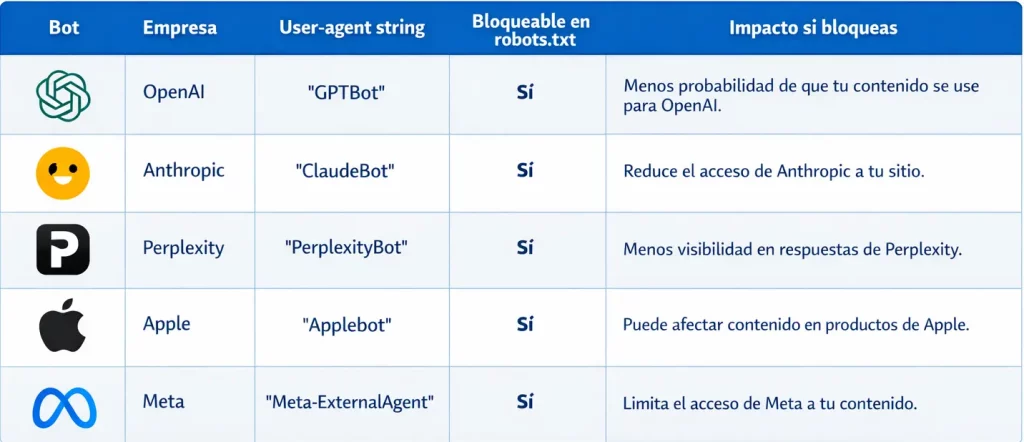
Current AI crawlers: GPTBot, ClaudeBot and Perplexitybot
Correctly managing the access of GPTBot, ClaudeBot and PerplexityBot in your robots.txt determines whether your content shows up as a source in the answers from AI engines. It’s the new technical SEO.
What each AI crawler does on your site
GPTBot (OpenAI)
- Crawls public pages to collect content that may contribute to training/improving models.
- It’s managed through rules in
robots.txtfor that user-agent.
ClaudeBot (Anthropic)
- Crawls public content to improve the usefulness and safety of the models (potentially for training purposes).
- Anthropic states that it operates with several robots and that you can control its access with
robots.txt.
PerplexityBot (Perplexity)
- It’s geared toward discovering and indexing sites for Perplexity’s search results and linking back to the sources.
- Perplexity specifies that it is not used to crawl content intended for foundation models.
GEO implication (for marketing)
- Allowing these bots can increase the likelihood of your content appearing and being cited in generative experiences or answer-based search engines, but in exchange you take on more exposure (copyright, paywalls, proprietary content) and possible extra server load. The decision is usually made section by section, not “all or nothing”.
How to manage AI crawler access with robots.txt
The most direct way is to define rules by User-agent in robots.txt. Typical examples:
# Block GPTBot (OpenAI)
User-agent: GPTBot
Disallow: /# Block ClaudeBot (Anthropic)
User-agent: ClaudeBot
Disallow: /# Block PerplexityBot (Perplexity)
User-agent: PerplexityBot
Disallow: /
If you’d rather allow only one folder (an “allowlist” model), you can do the opposite:
User-agent: GPTBot
Disallow: /
Allow: /blog/User-agent: ClaudeBot
Disallow: /
Allow: /blog/User-agent: PerplexityBot
Disallow: /
Allow: /blog/
Practical notes for webmasters:
- Perplexity explicitly documents the directives for PerplexityBot and warns that changes may take some time to take effect.
- OpenAI describes its crawlers and control via
robots.txtfor GPTBot. - Anthropic explains the purpose of ClaudeBot and access control via
robots.txt.
If you’d like, I’ll tailor it to your case with a simple policy: what to allow, what to block (for example, /checkout/, /my-account/, filters with parameters, paid content) and how to validate it with logs.
In internal technical audits at CRONUTS.DIGITAL during 2025, we found that approx. 55% of projects had clear signs of crawl budget waste that were holding back indexing: indexable parameters, uncontrolled pagination and duplication from filters, with a recurring pattern of URLs crawled with no value versus business URLs that took longer to enter or update in the index. Tools used: Screaming Frog and Google Search Console.
Frequently Asked Questions
What CMOs and directors ask us.
8 concrete questions answered in ≤ 80 words · optimal format for AI Overviews.


![How to Delete a Google Review: Step-by-Step Guide [2026]](https://cronuts.digital/wp-content/uploads/2026/07/portada-71008-1-768x403.webp)